Posts
SAP error 1 items have not been activated due to inconsistent withholding tax info
- Get link
- X
- Other Apps
This tutorial will explain you the process of solving one of the frequent withholding TAX error, which generally comes during the posting of Vendor Outgoing Payment. Program: RFWT0010 Error : 1 items have not been activated due to inconsistent withholding tax info. Please watch this tutorial till end and share your valuable feedback.
Define Accounts for Bank Charges (Vendors)
- Get link
- X
- Other Apps
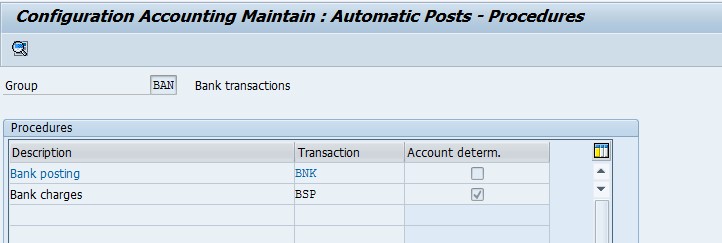
Define Accounts for Bank Charges (Vendors) Financial Accounting (New) → Accounts receivables and Accounts Payables → Business Transactions → Outgoing Payments → Outgoing Payments Global Settings → Define Accounts for Bank Charges (Vendors) T Code OBXK Double click on BSP Assign Bank charges GLs and press save Entry View In F-53 Please watch this video for more understanding. Thank You ***********************************************************************
Customer Part Payment Receipts in SAP
- Get link
- X
- Other Apps
Enter Transaction Code F-28 in SAP command box. Press enter Enter all the above details and Click on Process Open Item Click on Partial Payment Tab Enter Partial amount and Click on Simulate Check the entry view and press save. Please watch the below video and share your feedback also. ***********************************************************************************
Changing number format in SAP
- Get link
- X
- Other Apps
To Change the Number and Date format enter Transaction Code SU3 in SAP command box. press enter You Can also change the Date and Number format here Select Time format from this default tab After making the changes press save and login once again to see the changes. Please watch this video and share your feedback please. ***********************************************************************************
How to Set Decimal Places for Currencies in SAP
- Get link
- X
- Other Apps
Enter Transaction Code SPRO in SAP command Press enter Click on Set Decimal Places for Currencies Click on New Entries Enter Currency and Decimal Places and press save. Please Go through this video and share your valuable feedback. ***********************************************************************************
Excel Tricks - Change dates like 20160923 to one Excel can "understand"
- Get link
- X
- Other Apps
Step – 1 Select the date(s), Step – 2 Click Data tab, Text-to-Columns Step – 3 Which brings up the Text-to-Columns wizard Step – 4 Even though the dates are fixed width, in this case you can simply click "Next" twice. In step 3 of wizard Select Date, YMD: Step – 5 See the result below:- Please watch this video and share your feedback ***********************************************************************************
Park Customer Credit Memo in SAP (FV75)
- Get link
- X
- Other Apps
Enter T Code à FV75 in SAP command box Press Enter Enter : Customer Code Document Date Reference Posting Date Amount Business Section Business Place GL Code Amount Text Profit Center Then Click on Simulate Click on Post to park the invoice Please watch this video and share your feedback also. ***********************************************************************************
How to create Profit Center in SAP
- Get link
- X
- Other Apps
Objective - By this blog one can easily create the Profit center in SAP (ECC and S4HANA) Enter Transaction code KE51 in the SAP Command Field In the next screen, enter the controlling area in which the Profit Center is to be created In the next screen, enter a unique Id for the Profit Center In the next screen, enter the Following · Name of the profit center · Short description of the profit center · Person responsible for the profit center · Profit center group for which the profit center belongs to Press 'Save' button, for saving the profit center from the SAP Standard Toolbar The Profit center is saved in the inactive mode click ok and Press the 'Activation' Button for the activation of the profit center from the Application Toolbar Check the Status bar for the status of creation of profit cen...
Excel Tricks -- How do i Enable Insert option in Excel?
- Get link
- X
- Other Apps
The MS Excel's insert column option is disabled, after right clicking. I have tried using Excel options, but it's not working. How do I enable it? Here is the solution. Follow these steps: 1. Close all open Excel windows 2. In Windows Explorer, go to directory %appdata%\Microsoft\Excel 3. Rename the file: Excel15.xlb --> Excel15.old Please share feedback also. Thank You ********************End of this blog****************************
Document Number range maintenance (Year End Activity) in SAP S4HANA
- Get link
- X
- Other Apps
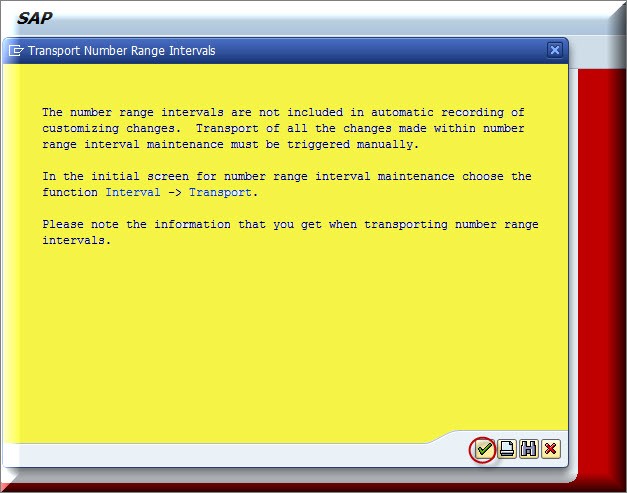
Objective is to Copy the number range of document types from previous year to the new Fiscal year i.e.2017 Use Transaction Code à OBH2 This activity should be done before 31 st march Click on continue System will display a message that number ranges interval are added. *********************************************************************************** Please go through this video for more information
Balances Carry Forward – GL in SAP
- Get link
- X
- Other Apps
Balances Carry Forward – GL in SAP Objective --> To carry over the closing GL balance from Previous fiscal year to next fiscal year. Transaction code à FAGLGVTR Fill the details as in the screen and execute in test run. And if there is no error tick off the test run and execute. This will carry forward the balances to next fiscal year and can be seen in Tcode : FS10N Go through this video and share your feedback. ***********************************************************************************
Bulk Scrapping of Asset in SAP
- Get link
- X
- Other Apps
Bulk Scrapping of Asset in SAP Objective : This blog will guide you in scrapping of bulk asset data in SAP. This is yearend / month-end tutorial. Enter T Code à AR01 in SAP command box and Press Enter Copy Asset data, which you want to delete and click on execute Go to Edit à Worklists à Click on create Type work list name then select Retirement without revenue and click OK Click Ok Note Down this work Queue code and Enter T Code à AR31 Enter Worklist and click on execute You can check the status and then after click on Release to Scrap the asset in Mass. Please go through this video and Subscribe our channel. *********************End of Blog***************************