Posts

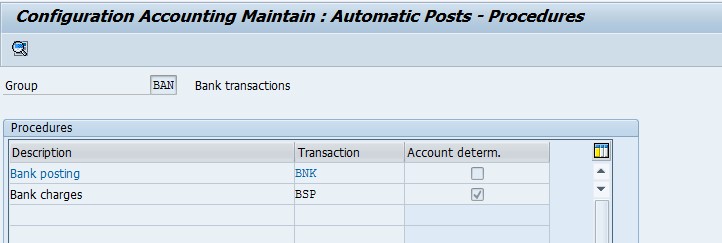
Define Accounts for Bank Charges (Vendors)
Image
  Define Accounts for Bank Charges (Vendors) Financial Accounting (New) → Accounts receivables and Accounts Payables → Business Transactions → Outgoing Payments → Outgoing Payments Global Settings → Define Accounts for Bank Charges (Vendors) T Code OBXK Double click on BSP Assign Bank charges GLs and press save   Entry View In F-53 Please watch this video for more understanding. Thank You ***********************************************************************

Open Asset Fiscal year in SAP

Image
Enter Transaction code  AJAB in SAP command box and press enter  First execute in Test Run Click on Yes Press back and execute the program in background  Please watch this video for more understanding. ***********************************************************************************

How to do Forecast of Data using Excel

Image

Customer Part Payment Receipts in SAP

Image
  Enter Transaction Code  F-28 in SAP command box.  Press enter Enter all the above details and Click on Process Open Item Click on Partial Payment Tab Enter Partial amount and Click on Simulate Check the entry view and press save. Please watch the below video and share your feedback also. ***********************************************************************************

Changing number format in SAP

Image
  To Change the Number and Date format enter Transaction Code   SU3 in SAP command box. press enter You Can also change the Date and Number format here Select Time format from this default tab After making the changes press save and login once again to see the changes. Please watch this video and share your feedback please. ***********************************************************************************

How to Set Decimal Places for Currencies in SAP

Image
  Enter Transaction Code  SPRO in SAP command Press enter Click on Set Decimal Places for Currencies Click on New Entries Enter Currency and Decimal Places and press save. Please Go through this video and share your valuable feedback. ***********************************************************************************

Excel Tricks - Change dates like 20160923 to one Excel can "understand"

Image
  Step – 1 Select the date(s), Step – 2 Click Data tab, Text-to-Columns Step – 3 Which brings up the Text-to-Columns wizard Step – 4 Even though the dates are fixed width, in this case you can simply click "Next" twice. In step 3 of wizard Select Date, YMD: Step – 5  See the result below:- Please watch this video and share your feedback ***********************************************************************************